Published on:
6 min read
Game On: Top Tips for Assembling a High-Performance Gaming PC
Building your own gaming PC can be an exciting yet daunting task. This guide will provide you with essential tips to ensure that your gaming rig is both powerful and efficient. Get ready to level up your gaming experience!
Choose the Right Components
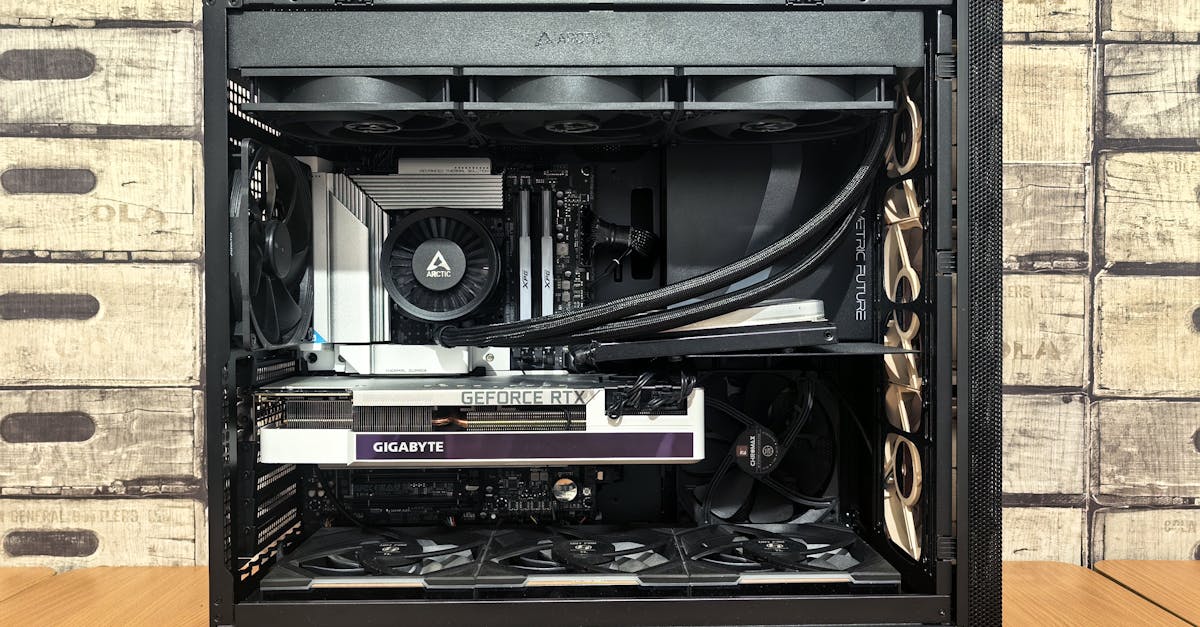
Selecting the right components is the foundation of a successful gaming PC build. Start with the CPU, as it will dictate the performance of your system. Options from Intel and AMD are popular, but ensure you choose one that matches your specific gaming needs. Next, consider the GPU; a powerful graphics card can significantly enhance gaming graphics and performance. Don't overlook other components like RAM, storage options (SSD vs. HDD), and the motherboard, which should be compatible with your CPU choice. Balancing all of these elements will ensure a coherent and high-performing setup that can handle your favorite games.
Adequate Cooling and Power Supply
When building a high-performance gaming PC, proper cooling and an efficient power supply are crucial. A top-tier GPU and CPU can generate a lot of heat, making an effective cooling system indispensable. Consider using liquid cooling systems or high-quality air coolers to maintain optimal temperatures during intense gameplay. Additionally, choose a reliable power supply unit (PSU) with enough wattage to support all your components, including potential future upgrades. Investing in these aspects will ensure stability and longevity for your gaming rig, allowing you to game without worrying about overheating or power issues.
Building and Troubleshooting
When it's time to assemble your PC, gather all tools and components in a clean, static-free environment. Follow detailed guides or instructional videos for step-by-step assembly. Start by installing the CPU and RAM on the motherboard before fitting them into the case. Installing the power supply first can make cable management easier as you progress. After assembly, ensure all connections are secure and perform a test boot to check functionality. If issues arise, don’t panic; troubleshoot common problems such as loose connections or incompatible parts. Online communities and forums are excellent resources for assistance and support.
Conclusion
Building a high-performance gaming PC may seem intimidating, but with the right tips and guidance, it can be an enjoyable experience. By selecting the right components, ensuring good cooling and power supply, and troubleshooting effectively, you'll create a machine ready for exhilarating gaming adventures. A well-built gaming PC not only enhances your gaming pleasure but also serves as a gateway to new levels of performance and enjoyment.
Published on .
Share now!